BoltSign Features
Powerful tools to streamline your document workflow
Core Document Signing Features
Everything you need for fast, secure, and compliant digital signatures
Advanced E-Signatures
Legally binding electronic signatures compliant with eIDAS, ESIGN, and UETA regulations worldwide.
- Draw, type, or upload signatures
- Biometric signature capture
- Digital certificates for qualified signatures
Enterprise-Grade Security
Bank-level security with 256-bit encryption and comprehensive audit trails for every document.
- SOC 2 Type II compliant infrastructure
- Tamper-evident document sealing
- Multi-factor authentication options
Workflow Automation
Streamline repetitive document processes with customizable workflows and intelligent routing.
- Sequential and parallel signing
- Conditional document routing
- Automated reminders and notifications
Document Management
Organize, track, and manage all your documents in one secure, centralized location.
- Document categorization and tagging
- Full-text search capabilities
- Document history and version control
Customization & Branding
Create a consistent, branded experience for all your signers with white-label customization.
- Custom email templates
- Branded signing experience
- Custom domain integration
API & Integrations
Seamlessly connect BoltSign with your existing business applications and systems.
- RESTful API for developers
- Native integrations with popular platforms
- Zapier and workflow automation tools
Document Preparation
Create signing-ready documents with our intuitive preparation tools.
Document Upload & Conversion
- Support for PDF, Word, Excel, and image formats
- Automatic conversion to signing-ready format
- Drag-and-drop document upload
Smart Field Detection
- AI-powered form field recognition
- Automatic placement of signature fields
- Template matching for common documents
Document Editing
- In-browser PDF editing capabilities
- Page rearrangement and deletion
- Merge multiple documents

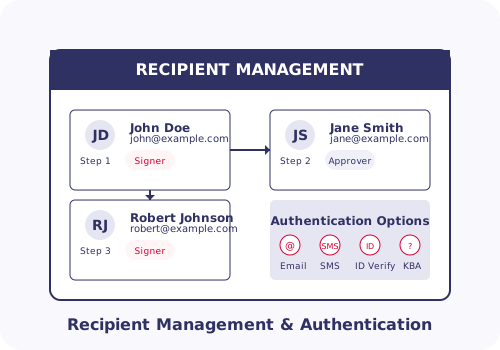
Recipient Management
Efficiently manage signers and participants in your document workflow.
Flexible Participant Roles
- Signers, approvers, and viewers roles
- CC recipients for notification only
- In-person signing facilitation
Authentication Options
- Email verification
- SMS/text message verification
- Knowledge-based authentication
- ID verification via government ID
Signing Order Control
- Sequential signing pathways
- Parallel signing capabilities
- Mixed sequential/parallel routing
Powerful Form Fields
Collect exactly the information you need with our diverse field types
Signature Fields
Electronic signatures with type, draw, and upload options. Includes initial fields for multi-page documents.
Text Fields
Collect typed information with optional validation for name, email, phone, dates, and more.
Date Fields
Automatic or manual date entry with calendar picker and format customization.
Checkboxes
Single or grouped checkboxes for selections, acknowledgments, and confirmations.
Dropdown Menus
Predefined options in dropdown format for standardized selections.
Radio Buttons
Mutually exclusive option selection for clear decision points.
Formula Fields
Automatic calculations based on values in other fields for totals, taxes, and more.
Attachment Fields
Request file uploads from signers for supporting documentation.
Large Text Areas
Multi-line text fields for comments, notes, and detailed responses.
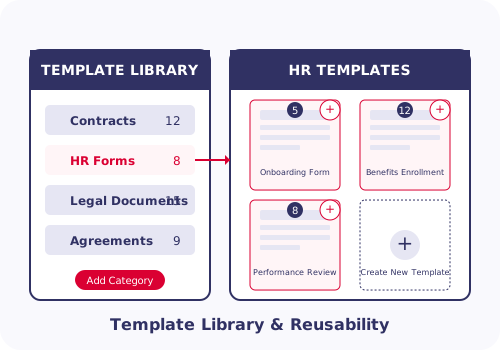
Templates & Reusability
Save time and ensure consistency with customizable document templates.
Document Templates
- Create reusable document templates
- Pre-place fields and recipient roles
- Template permission management
Bulk Send
- Send to multiple recipients at once
- CSV upload for recipient information
- Personalized fields for each recipient
Template Libraries
- Organize templates by category
- Share templates across team
- Template analytics and usage metrics
Mobile & Accessibility
Sign documents anywhere, anytime with our mobile-optimized platform.
Mobile Experience
- Responsive design for all devices
- Native iOS and Android applications
- Offline mode for document preparation
Accessibility
- WCAG 2.1 AA compliant
- Screen reader compatibility
- Keyboard navigation support
Internationalization
- Multi-language interface
- Right-to-left language support
- Regional date and number formats